Chat bot and alerts for Twitch and Kick
A chat bot for Twitch and Kick at once with custom commands, timers and shoutouts, plus alerts with your own image, sound and screen effects – all in one admin panel you can show on stream without revealing private data.
At a glance
| Commands | Custom commands with placeholders, !uptime, !so (shoutout), cooldowns against spam |
|---|---|
| Timers | Only run while you're live and only with enough chat activity |
| Alerts | Follow, sub, gifted sub, Bits and Kicks automatically; raids automatic on Twitch, via button on Kick; donations via Ko-fi |
| Look | Your own image or GIF, font, colours, animation, sound – with live preview |
| Extras | Community polls, goal bars, quests (quest journal), giveaways for Twitch + Kick, queue, counters, Discord go-live post, loyalty streaks, screen effects |
| Switching | Bring commands, timers and points from StreamElements, Streamlabs, Botrix or Nightbot – with preview |
| Team & tools | Own logins for mods, Stream Deck buttons, activity feed with “replay alert”, text labels, stats, !watchtime and !followage |
| Status | Test phase, running live on twitch.tv/paperpaal and kick.com/paperpaal – packages from €9 a month, spots on request |
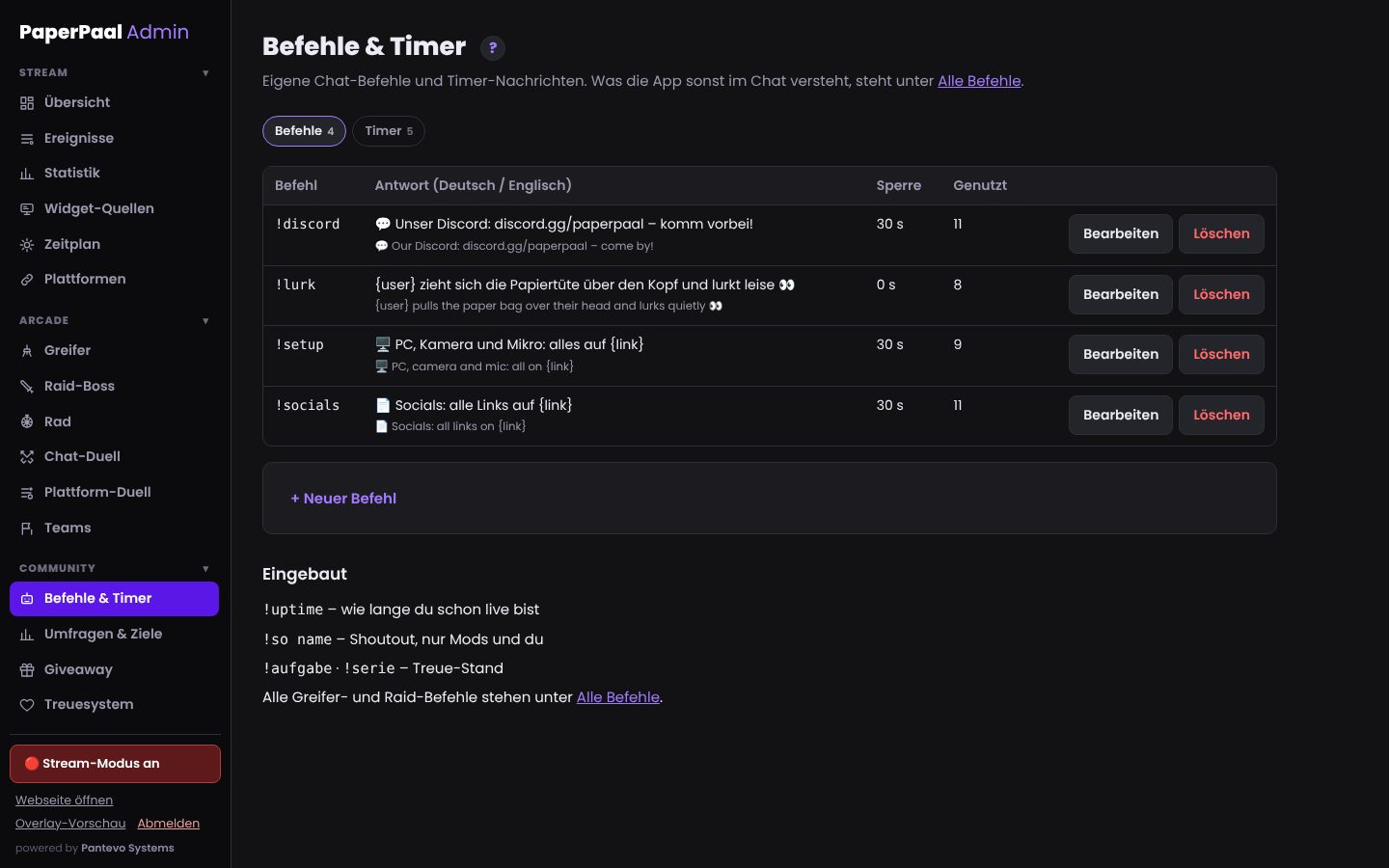
Custom commands and timers
Create commands like !discord or !setup yourself, in German and English. Timers post messages at fixed intervals – but only while you're live and chat is active. So the bot never spams an empty chat.
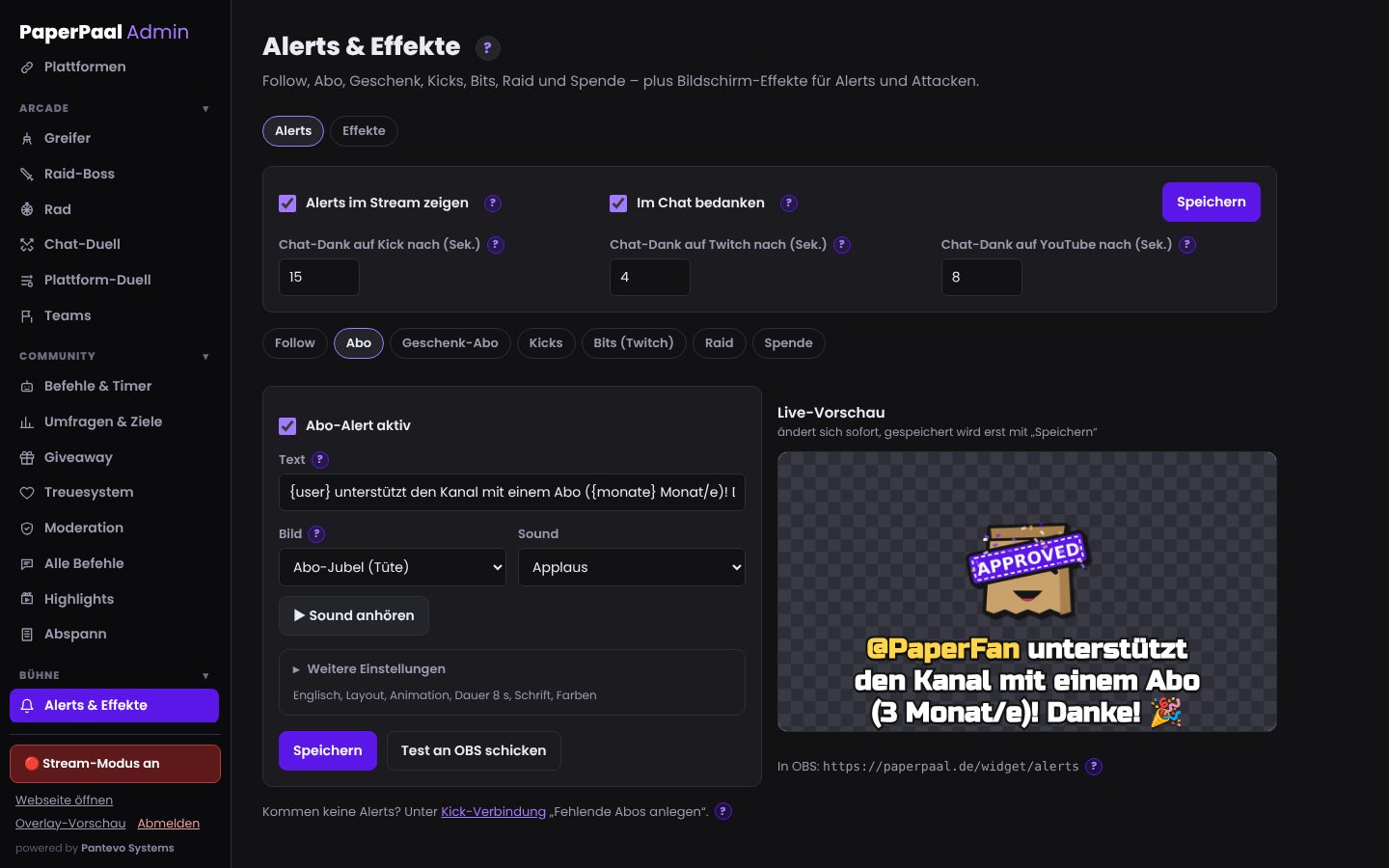
Alerts with editor and live preview
Each alert type gets its own look: image or GIF, layout, font, colours, animation and sound. You see changes instantly in the preview. On top there are screen effects like confetti, hearts or coin rain as a separate OBS source.
- Upload your own images and sounds
- Donations via Ko-fi without an extra tool
- Test alert with one click
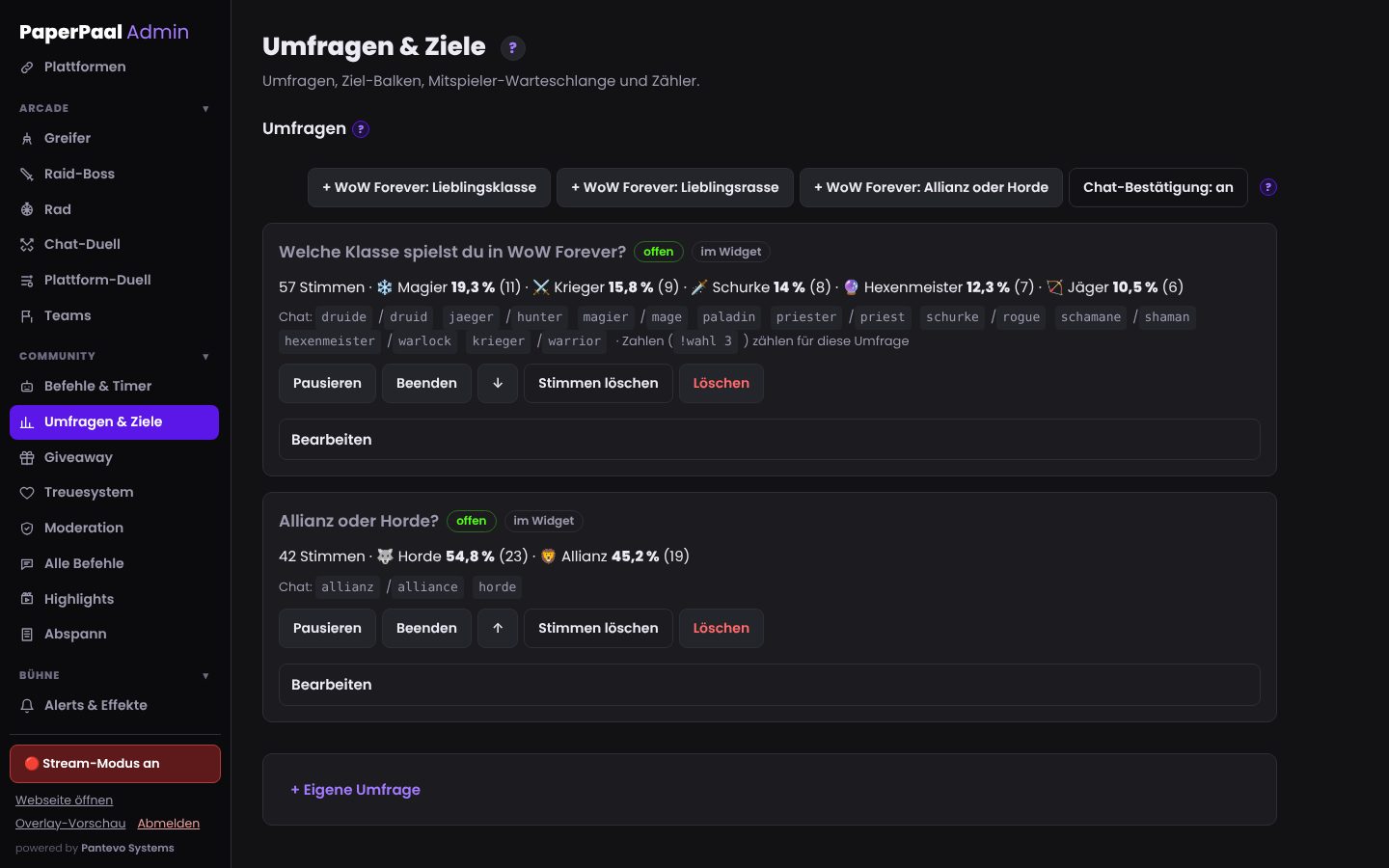
Community polls, goal bars and player queue
Ask your chat which class or game comes next: votes happen right in chat with !horde or !mage – on Twitch, Kick and YouTube – or on your website. Plus goal bars for followers and subs, a player queue with !join and counters like !deaths – each as its own OBS widget.
- Quests as a quest journal with “!” and “?” – RPG style
- Giveaways: one pot for Twitch and Kick, winner checks in via chat
- One vote per account, changeable
- Chat confirmations bundled instead of spam
- Anonymous mode for viewers
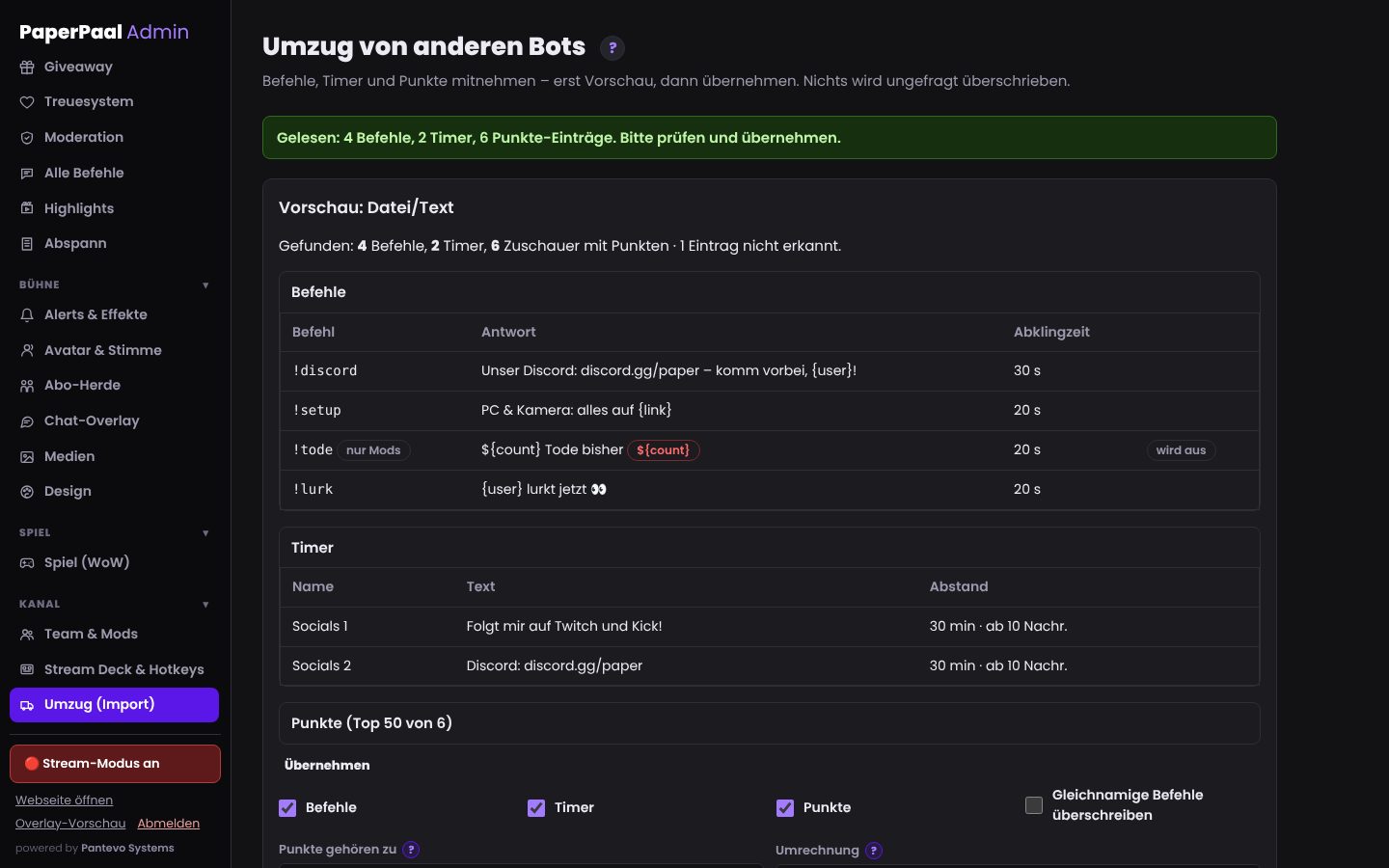
Switch in 5 minutes
You don't have to retype your commands, timers and loyalty points: for StreamElements the key from your dashboard is enough, for other bots a file or pasted text. You see a preview first, then import with one click. Variables like ${user} are translated, and points reach your viewers the next time they chat.
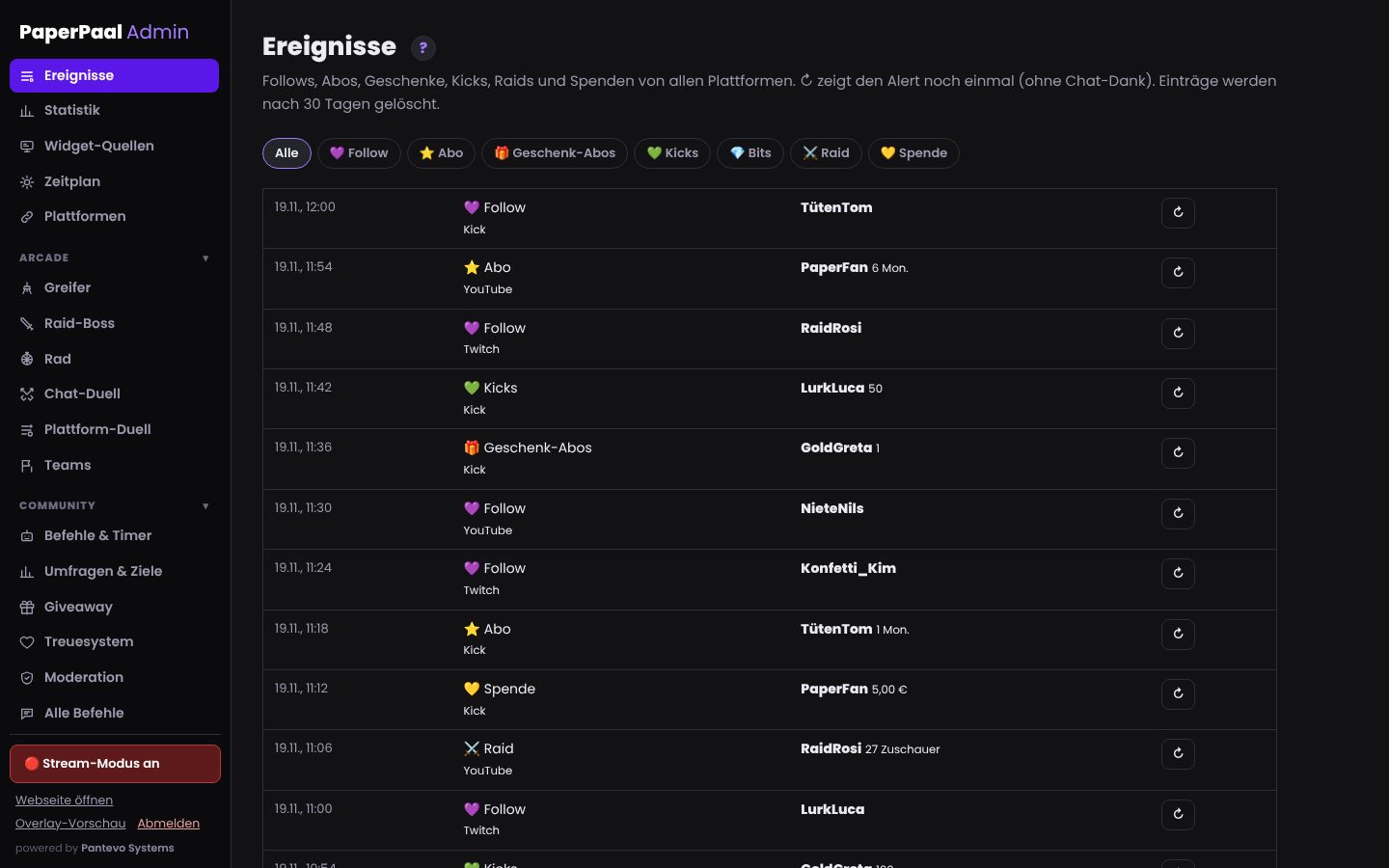
Activity feed, stats and Stream Deck
All follows, subs, gifts, Kicks, raids and donations from Twitch, Kick and YouTube in one list – also as a dock right inside OBS, with a button to replay an alert. The stats show viewers, chatters and follows per stream compared with the previous period. For your Stream Deck, every button gets its own secret URL: BRB, draw the giveaway or post !discord with one press.
- Text labels like “latest follower” for OBS
- !watchtime and !followage in chat
- Own logins for your mods
An admin panel you can show on stream
In stream mode, email addresses, tokens and webhooks stay hidden until you deliberately reveal them. So you can tweak your channel live without showing anything private.
What runs where??
- Works everywhereAvatar, break timer, looks & design, schedule, agenda, character card, counters, team access for mods, Stream Deck buttons, switching from other bots, AI stream recap?
- Twitch · Kick · YouTubeAlerts, activity feed & text labels, !watchtime/!followage, stats (viewers: Twitch + Kick), chat overlay with all chats, sub herd, auto clips and the “clip it” voice command (OBS file, plus a clip on Twitch; triggered by the Twitch or Kick stream), bot commands & timers, chat polls, giveaways, chat duels, platform battle (chats against each other), wanted level (stars from alerts on every platform, !wanted everywhere), teams, queue?
- Viewer accountLoyalty system: tiers, scraps & gear for your mini avatar?
- Twitch · KickClaw machine & album, raid attacks, wheel?
Offer
Start package
For Twitch, Kick and YouTube at once: chat bot, alerts & screen effects, one chat filter and chat overlay for all chats, auto clips (also by voice: “clip it”), AI stream recap (with your own OpenAI key), polls, quests & giveaways, activity feed & text labels, stats, !watchtime/!followage, team access for mods, Stream Deck buttons, switching from your current bot, all widgets and the standard looks.
€9 / month ApplyArcade package
Everything in Start, plus channel point games on Twitch and Kick (claw machine with album and trading board, raid boss, wheel), wanted level with GTA pack, chat duels, platform battle (Twitch vs Kick vs YouTube), teams, loyalty system with channel currency, sub herd with gear and sets, end credits.
€19 / month ApplyYour own look
One design for every widget: colours, fonts, frames and background to match your channel.
from €29 Request packageFAQ
Which alerts are available?
On Twitch: follow, sub, gifted subs, Bits and raids. On Kick: follow, sub, resub, gifted subs and Kicks. Everything arrives automatically via the official APIs; Ko-fi donations too.
Why aren't raids automatic on Kick?
Kick's official API doesn't report raids at the moment. Instead of an unofficial route that can break any time, there's a button in the admin panel.
Do I need another bot as well?
Not for commands, timers, shoutouts, alerts, activity feed, !watchtime/!followage and the Discord post – and whatever you set up in your old bot, you bring along via the import. If you miss a feature, mention it on the waitlist.
Can I bring my commands from StreamElements or Botrix?
Yes. In the admin under “Switch”: StreamElements directly with the key from your dashboard, Streamlabs, Botrix or Nightbot via file or pasted text. Loyalty points come along too, you set the conversion.
Is there !watchtime and !followage?
Yes, on Twitch, Kick and YouTube. Watch time is estimated from chat activity during the stream, because Kick's official API doesn't provide a viewer list; the bot knows follow dates from setup onwards.
How do I add the alerts to OBS?
As a browser source with one URL. Alerts and screen effects are separate sources so you can place them freely.
How much does the chat bot cost?
In the Start package €9 a month together with alerts, moderation, polls and widgets; with the grabber and games (Arcade) €19. Cancel monthly, self-setup with a guide is free.
More from the shop: